Tenant and suite context
Read rent alongside the tenant, property, and occupied space.
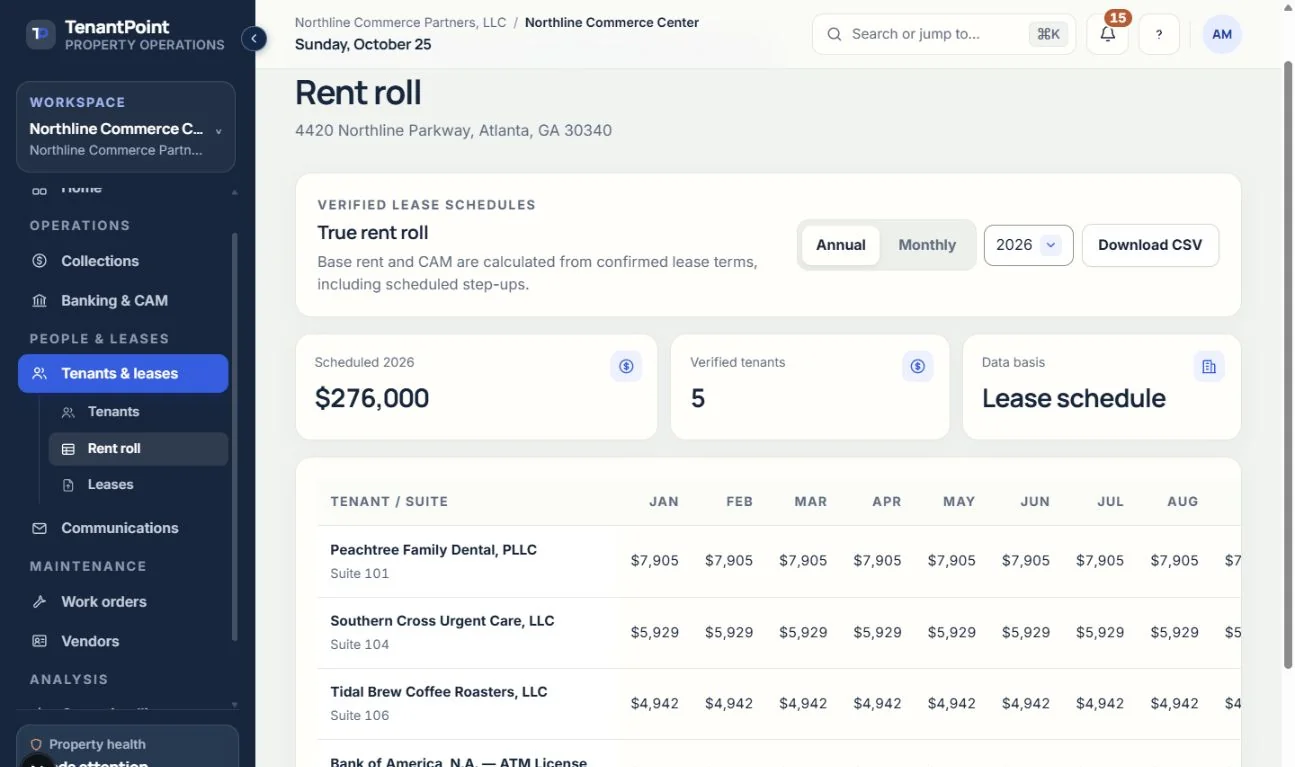
Review tenants, suites, occupancy, lease dates, and scheduled rent from the same property records used for day-to-day operations—not a second spreadsheet.
Owner briefing · Northline Commerce Center
Your property needs 3 decisions
AI prepares the work · You approve the action
Illustrative product view · fictional demo property
How TenantPoint handles it
Read rent alongside the tenant, property, and occupied space.
Review the dates that explain the current rent and upcoming lease decisions.
Keep verified rent steps and changes connected to lease information.
Move from the rent roll to collections, balances, and property reporting without rebuilding the tenant list.
Begin with accurate property, suite, tenant, and lease records. Review imported or extracted terms before relying on the resulting rent roll. A missing date or incorrect rent step belongs back in the underlying record, not in an isolated report adjustment.
Use the roll to understand who occupies the space and what is scheduled. Use payment history and open balances to understand what has been collected: scheduled rent is not the same as cash received.
Lease administration explains the term behind a rent figure. Collections shows recorded and outstanding amounts. Financial reporting provides the property-level operating picture. Keeping those views connected reduces repeated data entry while preserving the need for financial review.
Good to know
Scheduled rent and collected cash are different measures. Review collections, balances, and payment history alongside the rent roll rather than treating scheduled rent as a bank deposit.
Review and correct the source tenant or lease record so related views use the same verified information.
Start with your first property