Morning briefing
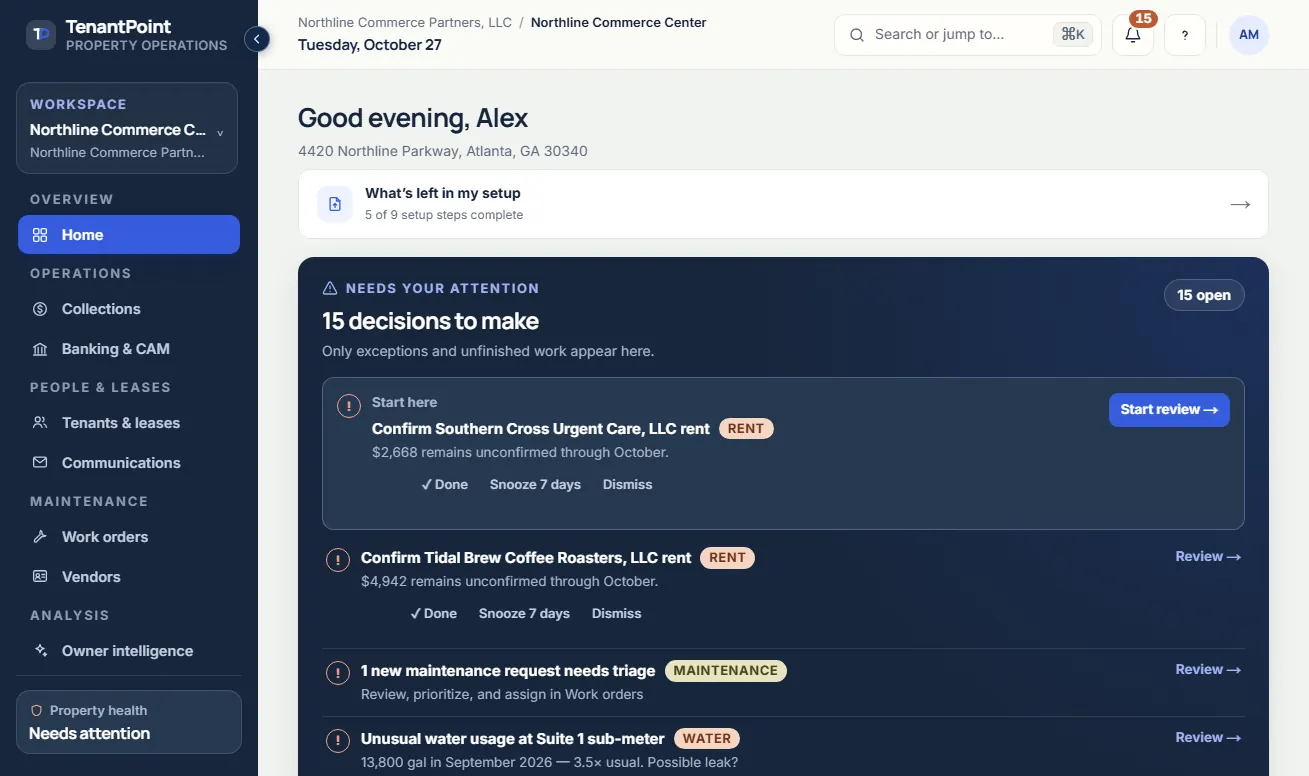
Open the day to the decisions that need you: unpaid balances, lease dates inside their notice window, bank transactions to allocate, open work orders, and CAM items waiting for approval.
Run leases, rent, CAM, banking, maintenance, tenant communication and reporting for a handful of commercial properties from one owner-friendly workspace, with published pricing and a 21-day free trial.

Owner briefing · Northline Commerce Center
Your property needs 3 decisions
AI prepares the work · You approve the action
Illustrative product view · fictional demo property
How TenantPoint handles it
Open the day to the decisions that need you: unpaid balances, lease dates inside their notice window, bank transactions to allocate, open work orders, and CAM items waiting for approval.
Upload the signed lease and amendments. Rent steps, CAM method, pro-rata share, option and notice dates, and responsibility clauses are extracted with a citation to the page they came from, and nothing takes effect until you approve it.
Track charges, payments, and open balances against each lease, bring in bank activity by CSV/OFX import or a Plaid feed where enabled, and categorize it against the property, tenant, vendor, or work order behind it.
Keep contacts, documents, balances, notices, insurance certificates, and work orders together—with a tenant portal where tenants see their lease, documents, and statements and report issues themselves.
The outcome
Replace scattered spreadsheets, text threads, and administrative follow-up with one clear operating rhythm.
Commercial property management software is the system a landlord uses to run the leases, rent, expense recoveries, maintenance, and tenant records of commercial buildings. It differs from residential tools because commercial rent comes from multi-year leases with scheduled steps, CAM or NNN pass-throughs that are reconciled every year, renewal options with notice windows, and insurance obligations, all billed by square footage or share.
For a strip center, a medical office building, or a mixed-use corner the work is not collecting twelve identical rents. It is knowing which lease steps up in October, which tenant's share of the parking-lot repaving is capped, when the option notice window opens, and whether the deposit that landed on Tuesday belongs to Suite 110 or Suite 112.
Many commercial owners do not need another enterprise platform or a full management company coordinating information they still have to review. They need a dependable system that shows what happened, what is due, and what decision comes next.
TenantPoint organizes the administrative side of self-management while leaving financial actions under owner approval. It is not an accounting system: most owners keep QuickBooks for the books and use TenantPoint for the property record that feeds them.
Each part of the work reads from the same record, so a lease term approved once shows up in the rent roll, the CAM rule, the tenant portal, and the operating statement without being typed again.
A lease term should inform the rent roll, late-fee decision, CAM rule, tenant communication, maintenance record, and eventual sale package. Keeping those workflows together prevents the same information from being entered repeatedly.
Every price is published. Owner is $99 a month, or $990 a year, for 3 properties, 30 tenant spaces, and 2 users. Portfolio is $249 a month, or $2,490 a year, for 10 properties, 150 tenant spaces, and 5 users, and adds QuickBooks Online, Zapier, and tenant ACH payments. Professional is $499 a month, or $4,990 a year, for 30 properties, 500 tenant spaces, and 15 users. Larger portfolios are priced by quote.
Every plan starts with a 21-day free trial, no credit card, and no sales call. Lease extraction, CAM reconciliation, work orders, the tenant portal, and reporting are on every paid plan, and there is no per-lease or per-unit fee.
The comparison pages check each vendor's own pricing page and say plainly where the other product is stronger. The short version: most commercial platforms are built for management companies and priced per unit or by quote, while TenantPoint is priced per property, published, and starts with a trial instead of a demo. The table below pulls the pricing and fit rows from those pages.
Twelve questions to ask before you trust any tool with a lease. The answers separate software built for commercial owners from residential software with a commercial checkbox.
The software is not a substitute for emergency response, physical inspections, legal advice, brokerage representation, tax accounting, or vendor supervision. It keeps the underlying record organized so those specialists can be used when their expertise is actually needed.
Begin with property and suite records, verify lease terms, then review scheduled rent, CAM, and outstanding amounts. Add banking context, manage the maintenance work, and give tenants access to their permitted documents and portal actions.
Connect the optional tools when they fit: Stripe for eligible tenant ACH payments, Plaid for read-only bank feeds where enabled, QuickBooks Online for selected accounting activity, and private Zapier or public-alpha developer access for supported operational workflows. Each has its own eligibility and setup requirements.
How it compares
| Tool | Published pricing | Start using it | Built for |
|---|---|---|---|
| TenantPoint | $99 / $249 / $499 per month for 3 / 10 / 30 properties ($82.50 / $207.50 / $415.83 billed annually); custom pricing above that | 21-day free trial, no credit card, no sales call | An owner-operator running 3–15 commercial properties |
| AppFolio | Starting per-unit rates are published; obtain a commercial quote and confirm minimum spend. | Book a demo with sales | Broad residential and commercial portfolios at scale |
| DoorLoop | Per-unit One, Connect, and Multiply plans with monthly minimums; confirm billing terms. | Confirm current trial and onboarding terms directly. | See comparison |
| Rent Manager | Not published—named tiers only, quote required | Request a demo with sales | Management companies across residential, commercial, and other property types, at varying scale |
| Excel + QuickBooks | No new subscription; the spreadsheet and accounting software you may already pay for | Nothing to set up beyond the files you keep today | General-purpose spreadsheets and bookkeeping, not commercial leases |
| Re-Leased | Not published. Core, Pro, and Enterprise all require requesting a quote. | Book a demo; no self-serve trial advertised | Commercial and mixed portfolios from landlords to large management companies (Enterprise: 1,000+ tenancies) |
| Buildium | Public—Essential from $62/mo, Growth from $192/mo, Premium from $400/mo ('starting at' pricing; scales with units) | 14-day free trial with sample data, no credit card | Professional managers across residential, associations, student housing, and commercial |
| Yardi Breeze | Public—commercial Breeze at $2/unit/mo, $200/mo minimum, annual agreement; Breeze Premier commercial by quote | Demo; no free trial advertised | Small-to-mid property managers across residential, commercial, and associations |
| STRATAFOLIO | $160 / $190 / $230 per month billed annually for the first 5 units, then $2 / $4 / $6 per additional unit; one-time onboarding fee | Demo-led with white-glove onboarding; no self-serve free trial advertised | See comparison |
Each figure is read from the vendor’s own pricing page; the source note on that comparison says when it was checked. See the ranked list for small owners.
Good to know
Software that runs the leases, rent, CAM or NNN recoveries, maintenance, tenant records, and reporting of commercial buildings. It is built around the lease rather than the unit: rent steps, pass-through reconciliations, option windows, and insurance requirements differ for every tenant, so the software has to read and apply each lease's own terms.
Commercial tenants have multi-year leases with scheduled rent increases, CAM or NNN pass-throughs that are reconciled each year, renewal option windows, and insurance requirements, all billed by square footage or share. Residential software is built around monthly rent, deposits, and move-in and move-out cycles, so it rarely tracks those commercial terms.
QuickBooks keeps the books. It does not know which tenant a deposit belongs to, what the lease says the CAM cap is, or when an option notice is due. Most owners keep QuickBooks for accounting and use TenantPoint for the property record that feeds it; on Portfolio and Professional, eligible workspaces can send selected accounting activity to their existing QuickBooks Online company after mapping and sync settings are reviewed.
It compares the estimated CAM tenants were billed during the year with the actual recoverable expenses, allocates the difference by each lease's method, share, and caps, and produces the true-up and the notice the tenant receives. In TenantPoint you review the expenses, confirm participation and the sharing basis, and approve the result before anything is sent.
TenantPoint publishes its prices: $99, $249, or $499 a month for 3, 10, or 30 properties, or $82.50, $207.50, or $415.83 a month billed annually, with custom pricing above that. Most competitors price per unit or by quote; the comparison pages list exactly what each one publishes.
Yes. The lease type is one of the fields extracted from the document, and the CAM method, share, caps, and exclusions follow what the lease says. Gross-up, administrative fees, and base-year or expense-stop provisions are not automated; the CAM reconciliation page lists what each workflow supports.
Each tenant has one record with lease terms extracted from the signed lease for your approval, rent roll and balances, CAM allocation, insurance certificate tracking with reminders, work orders, and a tenant portal where tenants see their lease, documents, and statements, report maintenance issues, and upload their insurance certificate. Tenant email is on every plan; SMS allowances depend on your plan.
No password and no app. Tenants sign in to the portal with a secure link sent by email, and they see only their own property, suite, and records, never another tenant's information.
On Portfolio, Professional, and configured Custom plans, a tenant can pay an outstanding balance by ACH through Stripe once the landlord has completed Stripe setup. The landlord pays a $1 platform fee per successful payment plus Stripe processing fees, ACH takes several business days to settle, and Owner and Trial do not include it.
Start with your first property