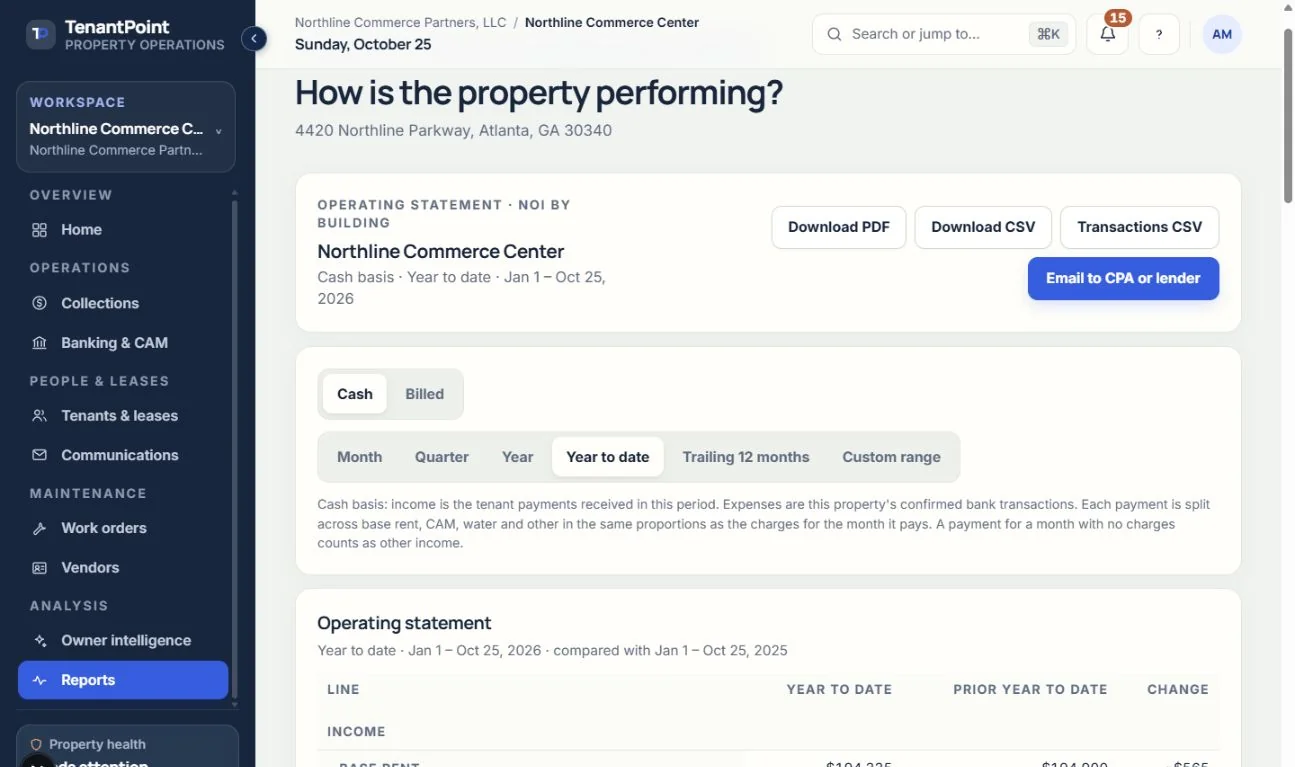
Operating statement and NOI
Income, expenses and NOI for each building or all buildings combined, income by space, AR aging, exports, and emailing your CPA or lender.
#What it shows
Reports opens with the operating statement for the property you have open. Income comes first: base rent, CAM recoveries, water, and other. Then operating expenses, by bank category, and net operating income (NOI). Capital improvements sit below NOI, and the last line is cash flow after them. Every plan has it.
Reports replaces the older “Cash performance” panel, which counted bank deposits rather than tenant payments. Owner intelligence still has its own cash performance view.
#All buildings
With more than one property, choose “All buildings” at the top of the statement to see every building combined. Each building's statement is worked out on its own and the lines are added together. Income by space and AR aging list every building's tenants with the building's name, and the PDF, CSVs and email cover all buildings. Bank transactions with no property yet aren't in any building, so they aren't in the combined statement either; assign them in Banking.
#Cash or Billed
The statement opens on Cash. On Cash, income is the tenant payments received in the period, by the date received, and a returned payment takes its amount back out in the period it came back. Each payment is split across base rent, CAM, water and other in the same proportions as the charges for the month it pays, and a payment for a month with no charges counts as other income.
Also on Cash, a confirmed bank deposit that isn't from a tenant, such as insurance proceeds, parking or vending, counts as other income, and so does money coming in to a category you created, whether you made it Income or Expense. These deposits are listed in income by space as “Bank items not tied to a tenant”. Money going back out of a category you created as Income, such as a refund, takes it back out of other income the same way. Deposits in Rent income or CAM income that aren't allocated to a tenant, and deposits matched to a tenant payment, aren't counted again.
A deposit allocated to a tenant in Banking but not matched to one of their payments counts as that tenant's other income on Cash (shared evenly when it's allocated to several tenants), and the statement points it out. If the same money is also recorded as a payment in Collections without being linked to this deposit, it's counted twice.
On Billed, income is the rent, CAM, water and other charges (late and returned-payment fees) billed for the period, from the lease schedule and assessed fees. A month's charges count when the month's first day is inside the period, so year to date and the trailing 12 months count this month in full. On a custom date range, a month only partly inside the range counts its rent, CAM and water for the days inside it: January 15 to February 14 counts 17 of January's 31 days and 14 of February's 28. One-off fees in that month, such as a late fee, a returned-payment fee, a termination fee or a CAM true-up, aren't split by the day: each counts in full if the day it was charged is inside the range, and not at all if it isn't. That's the day a late fee was assessed or a CAM true-up confirmed, in your time zone from Settings. A fee charged after its month ended, such as a March late fee added on April 20, counts as charged on the last day of March, so two back-to-back ranges never both miss it. A month that hasn't started yet isn't billed, so a period that runs past today counts only the months through this one.
On both, expenses are this property's confirmed bank transactions in the period. Transactions still waiting in review, ignored ones, and ones with no property yet aren't counted. Money back in an expense category, such as a $400 insurance refund, reduces that category's expenses. Withdrawals in an income category (Rent income, CAM income, or a category you created as Income), or matched to a tenant payment, aren't expenses either: they're income being reversed or refunded.
On Cash, a returned tenant payment comes out of income when you record the return in Collections. If the bank took back a payment in Rent income or CAM income and you never recorded the return in Collections, the statement takes it out of income anyway: Rent income from base rent, CAM income from CAM recoveries. A return recorded in Collections for the same amount (for the same tenant, when the withdrawal names one) is the same bounce, so it only comes out once, if the bank's withdrawal is dated between the day the bounced payment came in and 14 days after you recorded the return.
#Periods
Choose a month, a quarter, or a year (step back and forward with the arrows), year to date, the trailing 12 months, or a custom date range. The statement opens on year to date. The trailing 12 months runs from the first of the month eleven months back through today.
Every period is compared with the same dates a year earlier, with the change beside each line.
#Capital improvements
Mark an expense as a capital improvement in Banking, during review or from the Transactions tab. Choosing the “Capital improvement” category marks it for you, and moving it to another category takes the mark off. Marked expenses leave operating expenses and show below NOI, grouped by category. If a transaction is in the “Capital improvement” category but you took the mark off, the statement says so, because it still counts as an operating expense.
#Non-recoverable CAM
When a lease's CAM cap kept you from billing a tenant part of their CAM share, the statement adds a memo line, “Non-recoverable CAM”, with the amount from each approved CAM reconciliation. It shows for a period that covers the whole CAM year, such as that calendar year. It's for your information: those costs are already in operating expenses, so the memo doesn't change NOI.
#Income by space
Under the statement, income is broken down by space and tenant, on the same basis and period. Spaces come from Settings → Properties, and each tenant is listed under the space whose name matches their suite. Every space without a tenant is listed with its status, so vacant suites show. A tenant whose suite matches no space is listed after the spaces.
#AR aging
AR aging splits each tenant's open balance, as of the statement's end date, by how long it's been due: current (under 30 days past the rent due date, or not yet due), 30–59, 60–89, and 90 or more days. When the period runs past today, it's as of today. A payment received after that day isn't counted, since it hadn't come in yet. It uses the same balances as Collections. When a tenant paid more than a month's charges, the extra pays down their oldest open month first, and anything left over shows as a credit. A payment recorded for a month that hasn't come yet isn't counted in the aging until that month arrives.
#Exports
“Download PDF” and “Download CSV” export the statement with its income by space. “Transactions CSV” lists every tenant payment and every one of this property's bank transactions in the period, with category, capital mark, method, reference and status (on All buildings, every building's, with a Building column). Income by space, AR aging and the open balances report each have their own “Download CSV”. Anyone on the team can download them, Read-only included. They still download after a trial ends, and so does the PDF: it's your data.
#Emailing your CPA or lender
“Email to CPA or lender” sends the statement PDF, the CSV, or both, to one address you type. You can add a short note, which appears in the email, and tick “CC me” to send yourself a copy. It goes to the email you sign in with, or, if you're the workspace Owner and a notification email is set in Settings, to that. It's built from your saved records, sent under your sender name from Settings, and replies go to your notification email. Owners, Admins and Managers can send it, after a trial ends too; Read-only members can download the files instead. There's a limit on how many report emails can go out in an hour and a day: 10 per person per hour and 40 per workspace per day.
See the current workflow
These captures use controlled sample or internal demo records, not customer records. Available controls depend on your role, plan and account readiness.