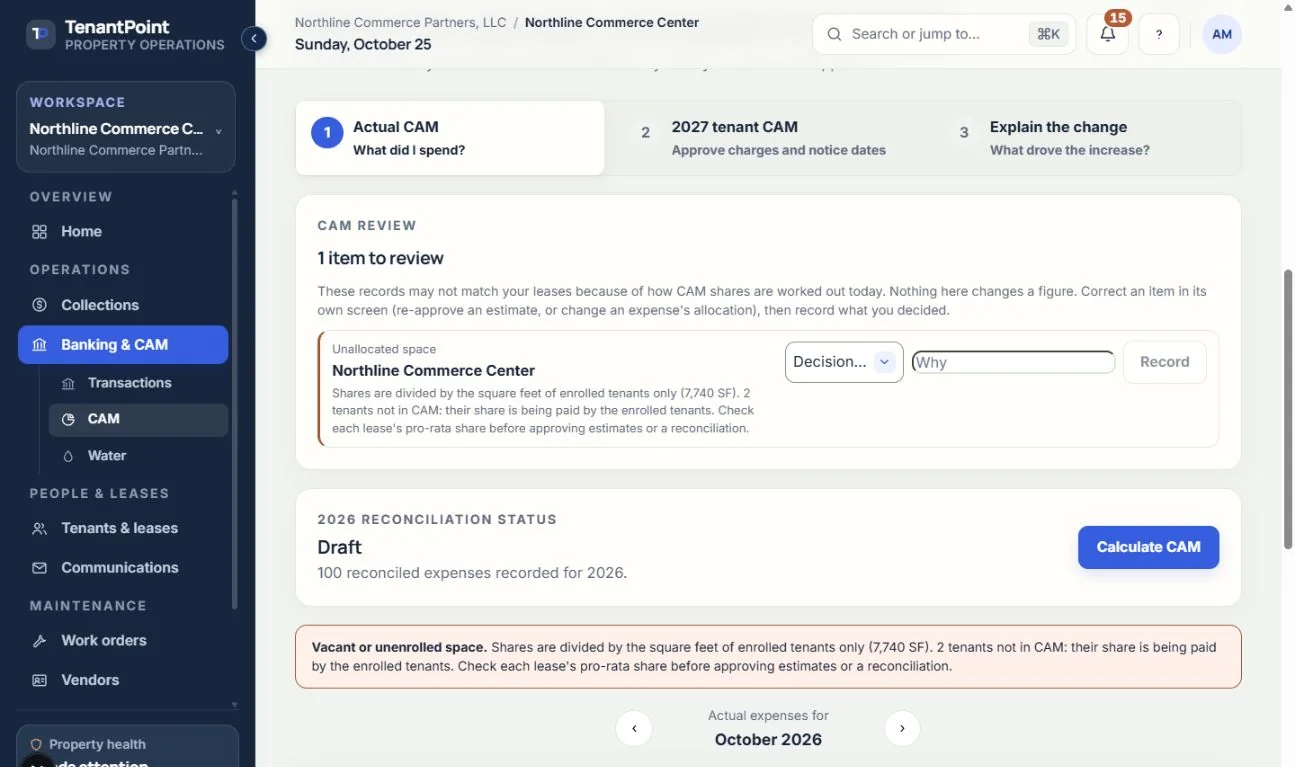
Actual CAM: what you spent
Turning reconciled bank activity into a recoverable total, month by month.
How this works today. Direct tenant expense bill-backs are not available. Review any legacy one-tenant expense that still counts in CAM. Explicit pool participation is separate from a bank transaction's allocation label and must be deliberately confirmed.
#When this property uses explicit pool participation
Use Calculate / open saved allocation for the selected year. Each pool shows its own numerator, denominator, raw share, exclusions, proration, cap reductions, final tenant allocation and landlord remainder. Missing membership, unassigned recoverable expenses or incomplete cap baselines prevent approval; they are not treated as zero-dollar success.
After a complete year has expenses, an owner/admin may approve the reviewed allocation. Approval preserves the sharing terms and calculation evidence, then drafts year-end true-ups for separate review. It does not assess a charge or send a notice. Reload the workspace to review the saved drafts. Already-decided ledger lines remain unchanged, and a repeated approval does not duplicate the drafts.
Approved explicit allocations are read from their immutable saved evidence, not recalculated from today's leases or bank rows. The legacy closing steps below continue to describe unconverted years. Support sessions may inspect explicit evidence but cannot confirm new allocation terms or approve it.
#Where the number comes from
Actual CAM counts only confirmed (reconciled) expenses that you marked CAM eligible in Banking, at the Recoverable % you set, plus common-area water from meter readings when Water setup is set to “Add to CAM” and that period's charges are created (unless the period's water bill already counts in CAM from Banking). An expense with no answer saved counts only if it's allocated to All tenants and its category is recoverable. Anything still in Review, or marked not CAM eligible, isn't counted. Changing an answer in Banking updates this number straight away.
Costs allocated to one tenant or selected tenants can no longer be marked CAM eligible. One marked before that change still counts, as before, and is listed under CAM review until you decide what to do with it.
#Closing the CAM year
The year moves through Calculate CAM → Approve reconciliation → Mark statements issued → Close CAM year. Approving the reconciliation saves the year's CAM cap figures for tenant statements. Once statements are issued or the year is closed, that year's figures are locked.
If any tenant's CAM share has a warning that needs review, Approve reconciliation stays unavailable until you tick that you reviewed them. Approving keeps a permanent record of each tenant's share, how it was worked out, the warnings and your tick. The tick records your review; it isn't a finding that the shares are right.
#The year-end true-up
Tenants pay CAM as monthly estimates. When you approve a year's reconciliation after the year is over, each tenant gets one true-up line to review: their actual share of the year's CAM less the CAM estimates billed to them for that year. If their estimates came in under their share, it's a charge. If they were billed more, or their CAM cap cut their share, it's a credit.
Their actual share is what the CAM center shows: their share of the year's recoverable spending, minus anything their lease excludes, and after their CAM cap if they have one. If their lease started or ended during the year, it covers only the days they were billed CAM, counted the same way as the monthly estimates: each month's days in the lease over that month's days. Days of a free-rent period where you unticked “CAM still owed” don't count, so the true-up never charges CAM the lease waived.
Nothing goes on a tenant's ledger until you confirm it. The Year-end true-up card on Actual CAM lists each line: Confirm posts it to the tenant's balance in the month you confirm it, and Don't post sets it aside. Each tenant gets one line per year.
Confirming a line also drafts a notice to the tenant in Communications → Outbox & history, with their actual share, the estimates billed and the charge or credit. Nothing is sent until you review it and send it. It goes by email, plus text when the tenant has a mobile number and your plan includes texts.
Late fees never apply to a true-up charge. A late fee is worked out on the month's rent and CAM estimate only, so an unpaid true-up charge is never part of it and can't make rent late on its own. Like any charge on the ledger, though, a true-up charge uses up a credit the tenant had, so that credit no longer covers a later month's rent. A true-up credit lowers their balance like any other credit.
For unconverted legacy years, once you confirm a line, the tenant's CAM PDF for the next year shows it under the year-end true-up: their actual share, the estimates billed, and the charge or credit with the month it posted. A line you haven't confirmed, or chose not to post, isn't on the PDF. If you downloaded it before confirming, download it again with the PDF button on the tenant's estimate. Explicit pool years do not generate a new per-pool statement PDF; retain their saved allocation evidence and review a notice in Communications instead.
For unconverted legacy years, before you approve, the card previews the lines. If the year's figures change after you approve, the card offers “Update proposed lines” for the ones you haven't confirmed yet. A legacy year approved before it was over gets its true-up once the year ends: open it and choose “Propose the true-up”. Explicit pool approvals require a completed year and remain immutable; changing current inputs never rewrites the saved approval.
For legacy years, once statements are issued or the year is closed, its true-up lines stay as they are. To update the lines you haven't confirmed, revert the year to approved first. A line you already confirmed never changes on its own. This legacy reopening workflow does not unlock an approved explicit pool result or allow historical conversion.
See the current workflow
These captures use controlled sample or internal demo records, not customer records. Available controls depend on your role, plan and account readiness.