Set up tenant ACH payments
An Owner or Admin connects the landlord's Stripe account in Integrations, checks ACH readiness and prepares tenants to pay by bank.
#Before you start
Tenant ACH collection is included on Portfolio and Professional plans and available on Custom as configured. Owner and trial plans do not include it. You must be the workspace's customer Owner or Admin, with authority to onboard the receiving landlord business and bank account. Your tenant also needs a valid lease, correct balance and enabled portal Payments access.
Stripe may require identity, business, receiving-bank information and further review. The authorized landlord completes its own legal attestations. Never use fictional demo identities for real onboarding or send bank details to support.
#1. Open the tenant-payment connection
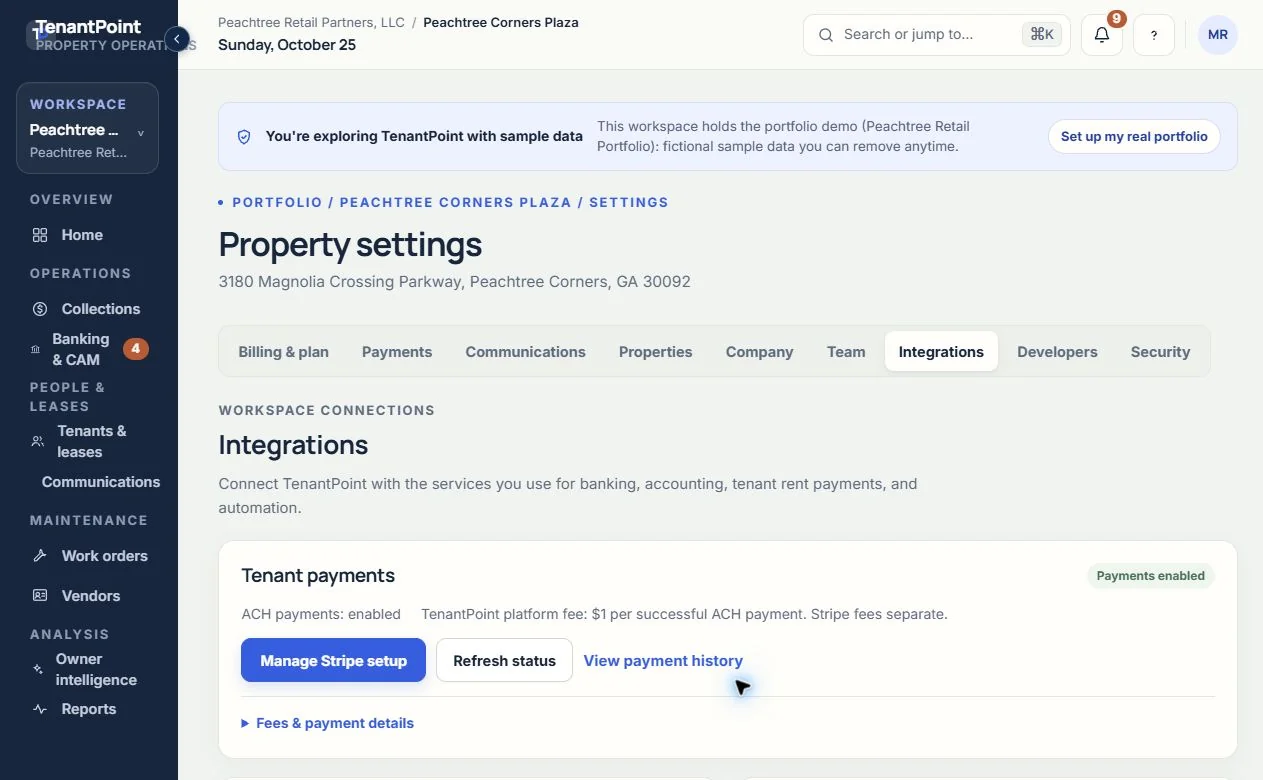
In TenantPoint open Settings → Integrations. Find Tenant payments and choose Set up payments if no account is set up. If setup has already begun, use Continue Stripe setup or Manage Stripe setup instead. Settings → Payments is the history view; it is not where new onboarding starts.
#2. Complete Stripe-hosted onboarding
Follow Stripe's hosted steps using the landlord's accurate legal and receiving-bank information. Review the information before submitting it. Return to TenantPoint when Stripe finishes or asks you to wait for review. Returning from Stripe alone does not mean bank payments are ready.
#3. Check readiness and resolve any request
Back in Settings → Integrations, choose Refresh status. Payments enabled together with ACH payments: enabled is the ready state. Setup incomplete, ACH activation pending or Action required means more time or information is needed. Use the Stripe setup control to address requirements; do not start another landlord account just to bypass review.
#4. Invite the tenant and explain the flow
From the tenant record choose Invite to tenant portal, using the tenant's verified contact email. Review their Portal sections so Payments is enabled. Tell the tenant to choose Pay now on the portal dashboard, review the Pay rent page and choose Pay by bank to open Stripe's secure authorization. Do not collect a tenant's bank login or authorize a payment on the tenant's behalf.
#Fees and expected result
TenantPoint's platform fee is $1 per successful ACH payment. Stripe processing fees are separate; actual fees and landlord net amounts appear in payment history when available. Tenant payments are separate from subscription billing and Plaid bank feeds. This guide does not promise a settlement time or that ACH cannot later be returned.
When ready, the landlord's card shows Payments enabled and eligible tenants with an outstanding balance can open Stripe's bank-payment flow. Review progress in Settings → Payments. No automatic recurring tenant debit is created by completing setup.
#Troubleshooting setup
If Tenant payments is unavailable, check your current plan, customer role and workspace access. If Stripe needs more information or the account is restricted, complete the requested steps in Stripe. If status cannot be loaded, retry rather than assuming the connection is ready. Existing history remains separate from readiness to initiate new payments.
See the current workflow
These captures use controlled sample or internal demo records, not customer records. Available controls depend on your role, plan and account readiness.